
The first ten minutes of a lot of first online classes go something like this. The video freezes. The child can hear the teacher but the teacher cannot hear the child. Someone runs to find a charger because the phone is on 9%. In the kitchen, the pressure cooker whistles. By the time everything works, half the class has gone.
None of it is anyone’s fault, and all of it is easy to avoid with fifteen minutes of setup the day before. This guide covers the device, the internet, the sound and the room, with the small Indian-household details that usually trip people up.
The device: what works best
Any of these will do. They just suit different situations:
| Device | Good for | Watch out for |
|---|---|---|
| Laptop or desktop | The steadiest option, with a bigger screen and easy typing | A webcam angled at the ceiling; old laptops running hot |
| Tablet | Kids, because it is light and the screen is a good size | Battery; games and notifications popping up |
| Smartphone | Adults, or as a backup | Holding it in the hand; a small screen for reading along |
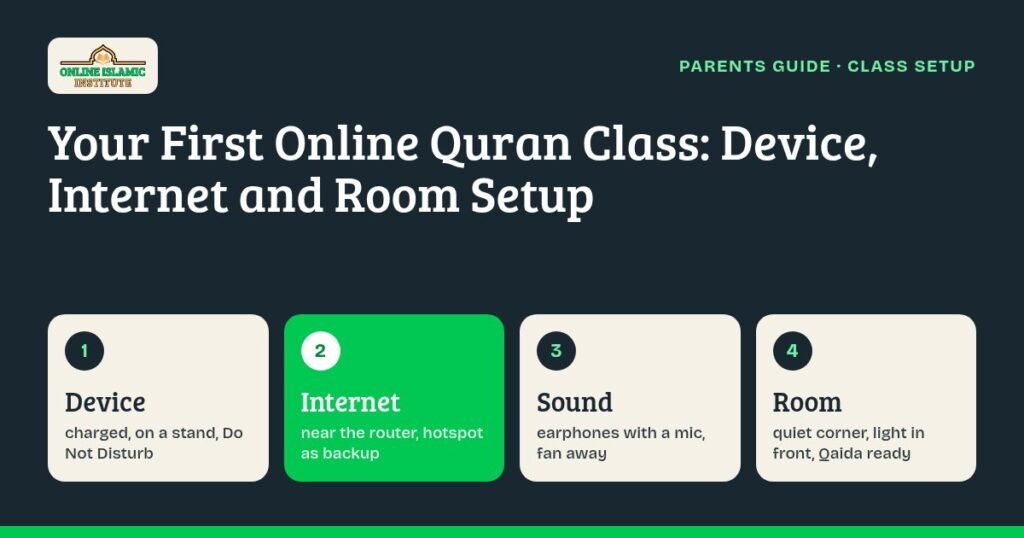
If you use a phone or tablet, put it on a stand or lean it against a few books, in landscape. A hand-held phone wobbles, drifts out of frame and gets heavy within ten minutes. Plug the charger in before class, switch on Do Not Disturb so WhatsApp forwards do not pop up mid-lesson, and close other apps.
Install and test the video app the teacher confirms when you book, the day before, not five minutes before. App updates have a habit of starting at exactly the wrong moment.
The internet
Home Wi-Fi on broadband or fibre is usually the most stable choice. Mobile data on 4G or 5G works too, and it is a very useful backup. A few things help more than a faster plan:
- Sit close to the router, or at least in the same room. Thick walls in many Indian flats cut Wi-Fi a lot.
- Keep the router on the inverter or UPS if you have one, so a power cut does not end the class.
- Ask the family to pause big downloads and HD streaming during the class slot.
- Run a quick speed test at class time, not in the afternoon. Evening speeds can be very different.
- Keep a hotspot ready. If the Wi-Fi drops, switching to your phone’s data is faster than waiting for the router to restart.
Sound matters more in a Quran class
In most online lessons a little bad audio is fine. In a Quran class it is not, because the teacher needs to hear the difference between ح and ه, or between س and ص. Those differences are small, and a cheap mic in a noisy room flattens them. (If you are curious why, the makharij al-huroof guide shows how close some of these letters are.)
- Wired earphones with a mic are simple and reliable. They also stop the echo you get when the teacher’s voice comes out of a speaker and back into the mic.
- For small children, over-ear headphones that fit properly are more comfortable than earbuds that keep falling out.
- Bluetooth headphones are fine if they are charged. Check that the right device is connected before class starts.
- Keep the mic close to the mouth and away from the ceiling fan. Fans are surprisingly loud on a call.
The room
You do not need a separate room, just the quietest corner you have at that time of day. Away from the TV, away from the kitchen, and ideally not on the side of the house facing a busy road with horns. Some practical points:
- Light in front, not behind. Sitting with your back to a bright window turns your face into a dark shape.
- A table, or the floor with a rehal. Both work. What matters is that the book and the screen are both easy to see without twisting.
- Siblings elsewhere, at least for the first few classes, while the child settles.
- Water and a bathroom trip before class, especially for little ones. It saves a five-minute break in the middle.
Some teachers like to see the page or the child’s finger moving along the line. Ask what your teacher prefers and angle the camera to suit.
Books and small things to keep ready
Have the printed Noorani Qaida or mushaf on the table, in the same script the teacher uses. Most families in India read the Indo-Pak script; if the teacher is using a Madani (Uthmani) mushaf on screen, mention it so you are both on the same page, literally. Add a pencil, a small notebook for homework, and a cloth to cover the book afterwards.
Many families also like children to make wudu before class. It takes two minutes and turns the start of class into a small routine the child recognises. The rest of the adab, from seeking refuge to handling the mushaf, is in our guide to the etiquette of reading the Quran.
If you are an adult learner
The same setup applies, with one difference: protect the time. If you are joining from the office, find a meeting room or a quiet corner and use earphones. If you are joining from home after work, tell the family it is class time and close the door. Our post on Quran classes for working professionals has slot ideas, and women who prefer a female teacher can see our online Quran classes for ladies.
The 15-minute checklist
- Device charged and plugged in, on a stand, Do Not Disturb on.
- Video app open and signed in; camera and mic tested.
- Earphones or headphones connected and checked.
- Wi-Fi working; phone hotspot ready as a backup.
- Qaida or mushaf, pencil and notebook on the table.
- TV off or far away, siblings busy elsewhere, water nearby.
- Join two or three minutes early.
If something still goes wrong mid-class, rejoin first, then switch to the hotspot. If it keeps failing, tell the teacher; they would rather know than guess.
Ready for the first class
Our online Quran classes in India are live and one-to-one, 30 minutes a day, five days a week, and run 24/7 in IST with male and female teachers available any time. Beginners start with Noorani Qaida online (here is how learning the Qaida online works), readers move on to Nazra, and parents can see the online Quran classes for kids page for how children’s classes run. Once your child is settled, our guide on supporting Quran learning at home covers the days between classes.
Fees are ₹4,000 a month, ₹21,000 for six months (₹3,500 a month) or ₹36,000 a year (₹3,000 a month), all in our fee section. Every new student starts with 3 free trial classes, so you can test your setup with a real teacher before paying anything.
Setup questions
Yes. Put the phone on a stand in landscape, keep it charged, and use earphones with a mic. A laptop or tablet gives a bigger screen for reading along, but a phone works.
A stable connection matters more than a fast plan. Home Wi-Fi on broadband or fibre is usually best, with mobile data as a backup. Sit near the router and pause big downloads during class.
They help a lot. Wired earphones with a mic stop echo and let the teacher hear the small differences between Arabic letters clearly.
The printed Qaida or mushaf in the same script as the teacher, a pencil, a notebook, and water. Many families also have the child make wudu first.
It helps. Stay nearby for the first few classes to sort out any sound or screen problems and help the child settle, then step back.
Set up the corner tonight, then book your 3 free trial classes and try it with a teacher.